
Admissions
Every enquiry followed through to enrolment, with nothing lost in a paper register.
- Enquiry to admission pipeline
- Document checklist per student
- Automatic admission numbering
School ERP software
Admissions, attendance, fees, examinations, transport, certificates and reports — one record per student, shared by the office, teachers and parents. Built for Indian schools, and light enough to work on a 2G connection.
The problem
Attendance in a register, fees in a ledger, marks in a spreadsheet, notices on WhatsApp. Every number has to be copied somewhere, and every copy is a chance to be wrong.
What's included
No tiered feature lists and no per-module pricing. Every school gets the whole system.
Every enquiry followed through to enrolment, with nothing lost in a paper register.
One profile per student that follows them across classes, sections and academic years.
Staff records, subject allocation, leave and the inputs your payroll needs.
Marked in a few taps from a teacher's own phone, with parents alerted automatically.
Structures and instalments set once; receipts, dues and reminders follow on their own.
Routes, stops and bus allocation, with transport fees folded into the same ledger.
From exam schedule to published report card, without a single spreadsheet.
Assignments issued to a class, visible to every student and parent in the app.
Class and teacher timetables that stay consistent, including substitutions.
Transfer, character and bonafide certificates issued while the parent waits.
Notices, SMS and in-app messages to a class, a section or the whole school.
Attendance, fee, result and staff reports for management, generated on demand.
Take a closer look
Pick a module to see the screen your staff would use every day.
A class teacher opens the app between periods and marks forty-two students in under a minute. Parents of absent children are notified automatically — no separate phone calls.
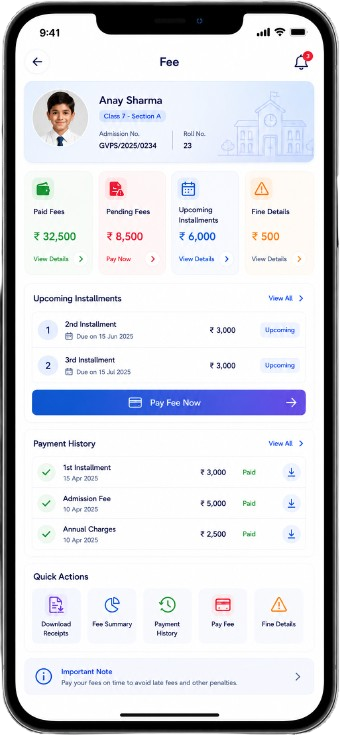
Define your structure and instalment dates once. Receipts go to parents, dues update live, and the collection report is ready whenever the management asks for it.
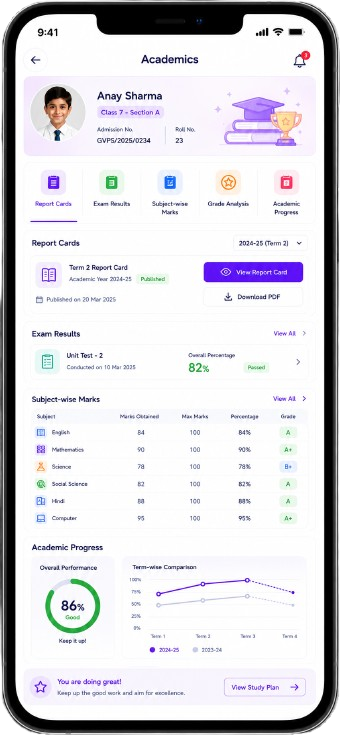
Subject teachers enter their own marks and the entry locks once submitted. Your grading scheme is applied automatically, and report cards publish to parents as PDFs.
Walk-in and online enquiries land in the same pipeline. Follow-ups are scheduled, documents are checked off, and admission numbers issue themselves in your school's format.
The details are already in the student's record, so a transfer certificate is a few clicks rather than a morning of retyping — on your letterhead, in the correct format, with a serial number.
Allocate students to routes and stops, and transport fees flow straight into the same fee ledger — so a parent sees one bill, not two.
How it works
This is the whole idea behind an ERP, and it's worth being precise about it. A student is created a single time, at admission. Every other module reads from that record rather than keeping its own copy — which is why the numbers stop disagreeing with each other.
Name, guardian, class, section, roll number and documents are captured once and given an admission number.
Attendance, homework, marks, fee receipts and transport allocation all attach to that same student.
The parent app shows the same figures the office sees — there is no separate copy to reconcile.
Because nothing was re-typed, any report — attendance, fees, results — is generated rather than compiled.
The practical details
The questions that come up in every demo, answered up front.
Built for every role
Everyone sees exactly what their work requires — and nothing that it doesn't.
The whole school at a glance, without asking anyone to prepare a report.
Admissions, fees and certificates handled at the counter, not after hours.
Everything from a phone, between periods, without a staffroom computer.
Informed without chasing anyone, in plain language on the phone they own.
Coverage
From metro campuses to single-building schools in district towns — the same system, the same support.
Hover a city below or a marker on the map to see a featured school.
Hover or focus a city to highlight it on the map. Don't see your district? We onboard schools anywhere in India — the platform is built for patchy connections precisely because of that.
Teacher & parent apps
A school system that only works in the office isn't much use to a teacher with five classes or a parent working in another city. Both get an app that does the part they need.
Getting started
You don't need an IT department. We do the migration and the training.
Send us whatever you have — registers, spreadsheets, an old system. We clean and import it.
Classes, sections, fee structure, grading scheme and letterhead configured to match how you already work.
Office and teaching staff trained on site or online, in Hindi or English, with a printed quick guide.
Parents get their logins. A dedicated contact stays with you through the first term.
What changes
Typical results across schools during their first three months on the platform.
Data encrypted in transit and at rest, with daily backups. Your school's data belongs to your school.
A class teacher sees their classes. The office sees fees. Nobody sees more than their work requires.
Light pages that load on 2G and keep working through the patchy connections rural schools live with.
Phone, WhatsApp and email support, plus a named onboarding contact for your first academic term.
Principal & management feedback
Buying an ERP is a management decision. These are the people who made it.
We didn't buy software. We bought back the three days a month my office spent reconciling the fee ledger — and the two weeks my teachers lost every term compiling results.
My honest worry was the staff. Half our teachers had never used school software. They were marking attendance on their own phones by the end of the training day.
I run three branches. Before this I got three different reports in three different formats. Now I open one screen and compare them.
Our fee collection improved because parents actually got the reminder. That wasn't a problem we set out to solve — it just followed.
We're a village school on a connection that drops most afternoons. It was the first system we tried that kept working anyway.
Inspection week used to mean a fortnight of preparing registers. This year we printed them the morning of.
What convinced the board was that the price didn't change when we asked for transport and certificates. Everything was already included.
School illustrations shown here. Real photographs and portraits are published only with written consent.
Questions
A school ERP is software that keeps admissions, attendance, examinations, fees, staff records, transport and communication in one system. Information is entered once and becomes available everywhere — to the office, teachers and parents — instead of being copied between registers, spreadsheets and message groups.
About a week for most schools. We migrate your existing data in the first two days, configure classes, fee structure and grading in the next two, train your staff, and go live around day seven. Larger schools with complex fee structures sometimes take a few days longer.
Yes. Send whatever you have — Excel sheets, an export from an older system, or even scanned registers — and we clean and import it as part of onboarding. There is no separate migration charge.
Any board or affiliation. The ERP doesn't assume a syllabus — your classes, subjects, grading scheme and certificate formats are configured to match how your school already operates, whether that's CBSE, ICSE or a state board.
No. Teachers do attendance, homework and marks entry from the app on their own phone. The office typically uses a computer for fees and certificates, but everything works in a browser — there is nothing to install.
The system is built deliberately light so it loads on 2G and keeps working through patchy connections. This was a design requirement, not an afterthought — a large share of the schools we work with are in semi-urban and rural areas.
Data is encrypted in transit and at rest, access is controlled by role so staff only see what their work requires, and backups run daily. Each school's data is kept separate and belongs to the school — you can export it at any time.
Yes, and cash and cheque payments recorded at the counter appear in the same ledger, so your collection report is complete either way. Digital receipts go to parents automatically.
Pricing depends on your student count. All twelve modules are included at every size — there are no per-module charges and no setup fee. Book a demo and we'll send a written quotation for your school.
Phone, WhatsApp and email support during working hours, plus a named onboarding contact who stays with you through your first academic term. Refresher training for new staff is included.
Book a demo
A demo takes about thirty minutes. We'll walk through the modules that matter to you and answer the awkward questions.
Online or at your school, whichever suits. No commitment either way.
Priced for your student count, sent afterwards in writing. No verbal-only numbers.
Call +91 94585 49015, Monday to Saturday, 9:00 AM – 6:00 PM.
We'll reply within one working day.
Twelve modules, one record per student, live in about a week — with migration, training and support included.